CREATE TABLE reference
To create a new table in the database, the CREATE TABLE keywords followed by
column definitions are used.
Syntax#
To create a table by manually entering parameters and settings:
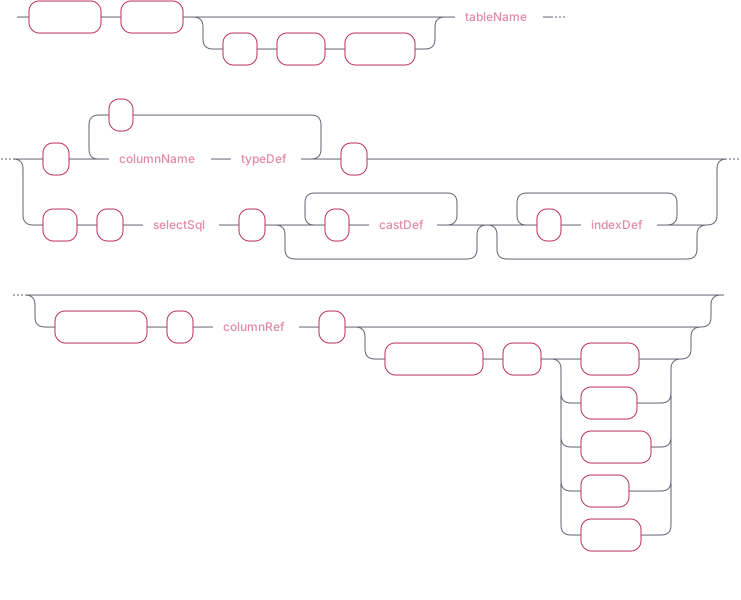
info
Checking table metadata can be done via the tables() and table_columns()
functions which are described in the
meta functions documentation page.
To create a table by cloning the metadata of an existing table:

IF NOT EXISTS#
An optional IF NOT EXISTS clause may be added directly after the
CREATE TABLE keywords to indicate that a new table should be created if one
with the desired table name does not already exist.
Table name#
Internally the table name is used as a directory name on the file system. It can
contain both ASCII and Unicode characters. The table name must be unique and
an error is returned if a table already exists with the requested name. Table
names containing spaces or period . character must be enclosed in double
quotes, for example:
Column name#
As with table names, the column name is used for file names internally. Although it does support both ASCII and Unicode characters, character restrictions specific to the file system still apply. Tables may have up to 2,147,483,647 columns.
note
Column names must be unique within each table and must not contain a period
. character.
Type definition#
When specifying a column, a name and
type definition must be provided. The symbol
type may have additional optional parameters applied.

Symbols#
Optional keywords and parameters may follow the symbol type which allow for
further optimization on the handling of this type. For more information on the
benefits of using this type, see the symbol overview.
Symbol capacity#
CAPACITY is an optional keyword used when defining a symbol type on table
creation to indicate how many distinct values this column is expected to have.
When distinctValueEstimate is not explicitly specified, a default value of
cairo.default.symbol.capacity is used.
distinctValueEstimate - the value used to size data structures for
symbols.
The symbol capacity is not to be confused with index capacity described in column indexes below.
Symbol caching#
CACHE | NOCACHE is used to specify whether a symbol should be cached. The
default value is CACHE unless otherwise specified.
Casting types#
castDef - casts the type of a specific column. columnRef must reference
existing column in the selectSql

Column indexes#
Index definitions (indexDef) are used to create an
index for a table column. The referenced table column
must be of type symbol.

An index capacity may be provided for the index by defining the index storage
parameter, valueBlockSize:
See Index for more information about index capacity.
CREATE TABLE AS#
When SQL (selectSQL) is SELECT * FROM tab or any arbitrary SQL result, the
selected column names and their data type will be cloned to the new table.
The data type of a column can be changed:
Here we changed type of price (assuming it was INT) to LONG and changed
type of sym to symbol and created an
index.
Designated timestamp#
The timestamp function allows for specifying which column (which must be of
timestamp type) should be a designated timestamp for the table. For more
information, see the designated timestamp
reference.
caution
The designated timestamp column cannot be changed after the table has been created.
Partitioning#
PARTITION BY allows for specifying the
partitioning strategy for the table. Tables created
via SQL are not partitioned by default and tables can be partitioned by one of
the following:
YEARMONTHDAYHOUR
caution
The partitioning strategy cannot be changed after the table has been created.
WITH table parameter#

The parameter influences how often commits of out-of-order data occur. It may be
set during table creation using the WITH keyword.
maxUncommittedRows - defines the maximum number of uncommitted rows per-table
to keep in memory before triggering a commit for a specific table.
The purpose of specifying maximum uncommitted rows per table is to reduce the occurrences of resource-intensive commits when ingesting out-of-order data.
The global setting for the same parameter is cairo.max.uncommitted.rows.
Checking the values per-table may be done using the tables() function:
| id | name | maxUncommittedRows |
|---|---|---|
| 1 | my_table | 250000 |
| 2 | device_data | 10000 |
QuestDB 6.5.5 and earlier versions#

From QuestDB 6.6 onwards, the database adjusts relevant settings automatically and provides optimal ingestion speed.
commitLag- equivalent tocairo.commit.lagexpects a value with a modifier to specify the unit of time for the value:unit description us microseconds s seconds m minutes h hours d days
For more information on commit lag and the maximum uncommitted rows, see the guide for out-of-order commits and ILP commit strategy.
CREATE TABLE LIKE#
The LIKE keyword clones the table schema of an existing table without copying
the data. Table settings and parameters such as designated timestamp, symbol
column indexes, and index capacity will be cloned, too.
Examples#
The following examples demonstrate creating tables from basic statements, and introduce features such as partitioning and designated timestamps. For more information on the concepts introduced to below, see
- designated timestamp reference on electing a timestamp column
- partition documentation which describes how partitions work in QuestDB
- symbol reference for using the
symboldata type
This example will create a table without a designated timestamp and does not have a partitioning strategy applied.
The same table can be created and a designated timestamp may be specified.
Let's assume we imported a text file into the table taxi_trips_unordered and
now we want to turn this data into time series through ordering trips by
pickup_time, assign dedicated timestamp and partition by month: